Best Shooting Settings in NBA 2K25

This guide breaks down the best shooting settings to elevate your shot game, from meter vs. no meter, to the new shot timing profiles, and even custom visual cues. Let’s dive in and optimize your shooting performance to help you dominate on the court. Buy Cheap MT 2K25 at U4GM, use “harry” coupons for an extra 5% off!

  1. Turn Off Your Shot Meter
    One of the first and most critical tips for improving your shooting is turning off the shot meter. We conducted tests comparing shooting with the meter on and off, and as expected, shooting with the meter off offers a significant boost to your chances of greening shots in NBA 2K25.

Looking at the data, turning off the meter provides nearly a 20% boost to your green window’s center, with a slight improvement at the edges as well. To maximize your shot potential, follow these steps:

  1. Go to your MyPlayer Tab.
  2. Navigate to Animations.
  3. Select Customize HUD at the top right.
  4. Set Shot Meter visibility to Off.

This change alone can significantly boost your jump shot accuracy.

  1. Enable Shot Feedback
    After turning off your shot meter, it’s important to enable shot feedback for better visibility into your shooting performance. This feedback will provide critical information like coverage, distance, and more—similar to what we’ve seen in previous 2K games.

To do this, go back to the Customize HUD settings and select Shot Feedback. Set the visibility option to All Shots for complete shot feedback, allowing you to understand the nuances of your shooting.

The default option, which only shows timing, may seem appealing because it offers instant green releases, but having complete shot feedback will help you improve your shooting consistency over time.

  1. Shot Timing Profiles: Risk vs. Reward
    NBA 2K25 introduces a new feature—Shot Timing Profiles. These profiles allow you to balance risk and reward, with different settings affecting your ability to hit whites (non-green shots) and pure greens (perfect shots).

Here’s a breakdown of the profiles:

  • Low Risk, Low Reward: This option provides more forgiving shot timing, making it easier to hit whites, but at the expense of a smaller green window. This is perfect for beginners or those looking for safer shots, though it won’t yield high-percentage greens.
  • Normal Risk, Normal Reward: This profile offers a balanced approach, with a slightly larger green window and moderate RNG (randomness) affecting white makes. It’s a good middle ground for players with decent shot timing.
  • High Risk, High Reward: This profile rewards more skilled players by offering the largest green window but a smaller chance of hitting whites. Players who master their timing will benefit most from this setting, as it mimics the feel of shooting in NBA 2K24.

Why High Risk, High Reward is Best:
In our tests, the High Risk, High Reward profile provided the best shot-making potential for skilled players. The pure green window sits at 100% for shots timed at 660 milliseconds, with a 60-millisecond window for green makes. For competitive players, this setting is recommended, as it offers the most control and the highest chance to green.

  1. Custom Visual Cues
    NBA 2K25 also introduces Custom Visual Cues, a new feature in the Jump Shot Creator that lets you fine-tune your release point for optimal accuracy. With 100 notches on the visual cue slider, you can pinpoint the exact moment to release your shot, giving you more control over your jumpers.

When creating new jump shots, pay attention to the release points such as jump, set point, push, and release, as these will vary depending on the visual cues you set. Spend some time in the Jump Shot Creator experimenting with different cues to find what works best for you.
TFD: Guide to Maximum DPS for Enduring Legacy

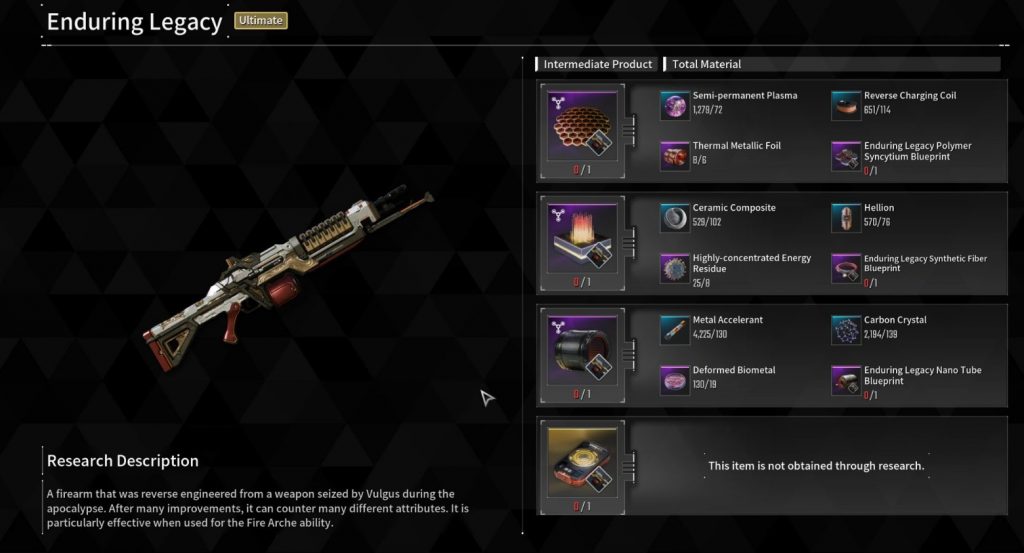
Today, we’ll dive deep into the Enduring Legacy light machine gun. In this guide, we’ll cover the optimal build for Enduring Legacy, including the best modules to use, key perks, and effective strategies for maximizing its damage output against hard mode bosses. Buy TFD Enduring Legacy Weapons Unlock, use “harry” coupons to get 5% off!

Understanding the Enduring Legacy’s Unique Perk: Craftsmanship

The Enduring Legacy light machine gun has a unique perk called Craftsmanship, which revolves around fire elemental damage. This perk applies a quenching debuff to your target, reducing their fire resistance and increasing the damage they take from fire attacks. Additionally, when hitting an enemy already inflicted with burn, you gain a percentage increase in firearm attack as extra damage. At rank four, the Enduring Legacy offers a 45% reduction in fire resistance for enemies and an 11% increase in damage against burning enemies. This makes it a reliable weapon for consistently applying burn effects, thanks to its fast fire rate and large magazine.

Recent Buffs to the Enduring Legacy

The Enduring Legacy has received significant buffs recently. Its critical damage multiplier increased from 1.7x to 2.3x, greatly enhancing its effectiveness in crit-based builds. This makes it one of the top choices for light machine guns focused on critical damage output.

Optimal Module Setup for Maximum DPS
Buy TFD Void Intercept Boost to quickly get the mods and required parts.
To fully exploit the potential of Enduring Legacy, prioritize the following modules:

  1. Primary Modules:
  • Firearm Critical Hit: Boosts your overall critical hit chance.
  • Critical Hit Damage: Increases the damage dealt on critical hits.
  • Rounds per Magazine: Ensures sustained fire, maximizing DPS.

  1. Secondary Modules:
  • Fire Rate: Increases your rate of fire, helping to apply burn effects and deal damage faster.
  • Negative Recoil: Reduces the recoil, making the weapon more accurate and easier to control.

  1. Special Considerations:
  • Expand Weapon Charge Module: Essential for Descendants other than Glay, as it provides additional magazine capacity, allowing you to maximize DPS.
  • Elemental Enhancement Module: Useful for adapting to specific boss encounters by changing the elemental effects based on the type of Colossus you are facing.

For more versatility, you can replace critical hit rate with a bonus attack against Colossus, particularly for farming specific bosses or elite units. This setup makes the Enduring Legacy not only a formidable boss killer but also effective for general combat scenarios.

Enhancing Enduring Legacy with Descendant Modules

For further optimization, use modules that enhance critical hits, such as:

  • Enzo’s Supply Firearm Enhancer: Provides a significant boost to critical hits, potentially exceeding 120,000 damage per hit.
  • Reinforce Frontline Skill Module: This module complements the critical build, making it easier to land consistent crits.

Additionally, modules like the Passionate Sponsor Module offer a 75% bonus to firearm damage, making them excellent for support DPS combinations, such as with Yujin.

How to Unlock Luna in The First Descendant

Luna is a new descendant available in The First Descendant, and this guide will walk you through the steps to unlock her efficiently. The process involves collecting various items and materials to craft Luna. Buy TFD Character Unlock Boost services to quickly unlock Luna, use “harry” coupons to get 5% off! Below are the detailed steps and tips to help you complete this task quickly.

Materials Needed
Buy TFD Void Intercept Carry to quickly obtain materials and blueprints.
To craft Luna, you need four main items:

  1. Luna’s Enhanced Cells
  2. Luna’s Stabilizer
  3. Luna’s Catalyst
  4. Luna’s Code

  1. Luna’s Enhanced Cells
  • Materials Required:
  • Silicon: Found in Echo’s Swamp (Hard or Normal) from resource or munition boxes.
  • Carbon Crystal: Located in Hagios (Hard or Normal) in similar boxes.
  • Pure Energy Residue: Obtained from Fortress Hard encrypted boxes. Use ping to locate Code Breakers for Pure Energy Residue.
  • Blueprint Location: Complete the mission “Vesper Shelter” on Normal. The blueprint has a 38% drop rate.

  1. Luna’s Stabilizer
  • Materials Required:
  • Flector and Helen: Found in resource or munition boxes.
  • Highly Concentrated Energy Residue: Best acquired from Code Breakers in encrypted storage boxes.
  • Blueprint Location: Complete the “Dead Right” mission for the 68 Mton Double A Pattern. Aim for the morphis material 068, tied to “Dead Bride,” with a 32% drop rate.

  1. Luna’s Catalyst
  • Materials Required:
  • Super Fluid and Hardener: Located in resource or munition boxes.
  • Specialized Biometal: Farmed from Strategic Outposts; avoid fusion reactors.
  • Blueprint Location: Get the morphis material from “Moonlight Lake Vogus” (pattern 015). Use the void Fusion reactor with the necessary morphis material.

  1. Luna’s Code
  • Materials Required: Gather from the mission “Agna Desert Hard” or by fighting “Swamp Walker” in the void intercept battle.
  • Blueprint Location: The morphis material 094 is linked to “Swamp Walker,” with a 32% drop rate.

Crafting Luna

  1. Collect All Necessary Materials: Follow the steps outlined above to gather all required materials and blueprints.
  2. Visit Anasie in Albion: Once you have all the materials, go to Anasie for research and crafting.
  • Research Process: Initiate the research process for Luna’s Enhanced Cells, Stabilizer, and Catalyst, which takes approximately 8 hours each.
  • Final Assembly: After gathering all parts and completing the research, craft Luna, which takes an additional 16 hours.

Tips

  • Fast Travel: Utilize fast travel to move between outposts and gather resources quickly.
  • Team Up: Working in teams can speed up the process, especially when handling Code Breakers or farming missions.
  • Prepare Multiple Runs: Collecting more materials than needed can be helpful in case of low drop rates.

By following these steps and tips, you should be able to unlock Luna efficiently in The First Descendant.

Madden 25 Game Modes: Everything You Need to Know

The release of Madden 25 is inching closer and closer, with more information about the game being made available almost daily. However, many players want to know which are the game modes of Madden 25. So let’s find out in this article!

Madden 25 will have four game modes, which are Ultimate Team, Franchise, Superstar, and Quick Play. All of these game modes deliver a unique gaming experience!

Ultimate Team Mode

Ultimate Team is the most popular game mode in the history of the Madden franchise. It’s an online mode that allows players to assemble their dream team, using current NFL superstars and also legends of the game, to battle other players, and prove they are among the best of the best Madden players.

Madden 25 Ultimate Team Mode such as Challenges, Solo Battles, Head 2 Head, House Rules, Mut Draft, Play a Friend, Practice, and More. All of these sub-modes allow players to earn Madden 25 Coins, packs, and other rewards they can use to then upgrade their squad. By the way, coins are the core of building a dream team. You need a lot of coins to buy or upgrade players. We recommend you buy cheap Madden 25 coins from Ezmut, 100% safe and fast. In this way, you can skip the arduous stage of earning coins and directly enjoy the joy brought by the game. Last, don’t forget to use code “Mods” to enjoy an extra 5% off!

Franchise Mode

Despite the neglect that the Franchise mode has suffered in the past few years, the mode is still extremely popular and has a loyal fan base. As the name indicates, this mode allows players to take control of an NFL franchise of their choice, with the main goal being winning the Vince Lombardi trophy.

Players have full control of everything that is going on inside the franchise, such as scouting, hiring and firing the coaching staff, making trades, and more. It allows players to experience what it’s like to be an NFL general manager. It’s worth noting that, this year Franchise Mode is introducing some great new features, and revamping existing ones, such as a rebuilt environment, fresh player fits, iconic moments, a draft prospect board that’s easier to navigate, and real-time draft grades. See inside team war rooms and green rooms as the night progresses, then meet Roger Goodell on a new NFL Draft stage in a fresh fit that suits you. This will hopefully make the mode feel more immersive, and also deliver a better gaming experience to the players.

Superstar Mode

The Superstar mode allows players to live the life of an NFL player, experiencing the highs and lows, wins and losses, while trying to leave their mark on the league and enter the Pro Football Hall of Fame.

Players can customize their character in a plethora of different ways, and as they play games and reach milestones, they will earn points to improve their character. This mode tries the deliver the most realistic and immersive experience possible, to make players feel like real NFL athletes. We hope EA Sports introduces some new features to the mode, that will help accomplish just that.

Quick Play

Last but not least, we have the Quick Play mode, which has four sub-modes, Play Now, Online Head-to-Head, Pro Bowl, and Superstar KO.

Play now allows users to play a custom game against the CPU or their friends, and is the perfect mode if you just want to play a quick game. In Online Head-to-Head, players will face off against other users, and try to win as many games as possible to climb the leaderboards. Each user will pick one of the 32 NFL teams, and they will play with the default rosters. The Pro Bowl mode lets players play the traditional Pro Bowl match, either alone or with a friend, in a couch co-op experience. As for the Superstar mode, players will draft a team of superstars, and play against each other until only one is left standing.

Ultimate XP Farming Guide in The First Descendant

Today, I bring you a new and improved XP farming guide. While this method may not give you more XP than the current popular farm, it has other advantages that make it a better option overall. Ensuring I provide you with the fastest, most efficient ways to farm XP. You can buy TFD Campaign Boost to get a lot of BEST MATERIAL. Use “harry” coupons for even more savings.

The Two XP Farms

The two farms discussed today are Kingston Special Operation. Both farms were tested under fair conditions to ensure accurate comparisons. Used two level 1 characters, Kyle and Blair, ensuring no XP boosts were active during the tests.

Farm 1: Kingston Special Operation

Buy TFD Zone Missions Boost to speed up your rewards.

This is the original and well-known XP farm. However, it has its drawbacks, mainly due to AFK players. Here’s how it went:

  1. Character: Kyle
  2. Level: 1 to 26 in one hour
  3. XP Buffs: None
  4. Play Style: Active participation, no AFK

While this method yields a good amount of XP, it can be frustrating due to AFK players. If you prefer leveling up without dealing with inactive teammates, you might want to consider the second farm.

Farm 2: Rockfall on Hard Mode

This farm not only provides a similar amount of XP but also offers additional rewards. Here’s the breakdown:

  1. Character: Blair
  2. Level: 1 to 25 in one hour
  3. XP Buffs: None
  4. Play Style: Active participation

Steps:

  1. Start the mission and run to the first group of enemies.
  2. Clear enemies in a loop, moving through the designated path.
  3. Fight the boss and restart the mission if needed.

This farm is more engaging and rewards you with gold, Kyper shards, and materials. Despite yielding slightly less XP (one level less), the additional resources make it a superior option for leveling up and upgrading your characters.

Detailed Rewards

  • Quantum Crystals: 115,000
  • Nano Compounds: 282,000
  • Kyper Shards: 225,000
  • Gold: Just under 4 million

While the Kingston Special Operation is great for quick XP, the Rockfall farm on hard mode is more rewarding overall. You get almost the same amount of XP plus a wealth of resources to boost your progress.