College Football 27 Dynasty Mode: NIL System Completely Rewrites Recruiting Strategy

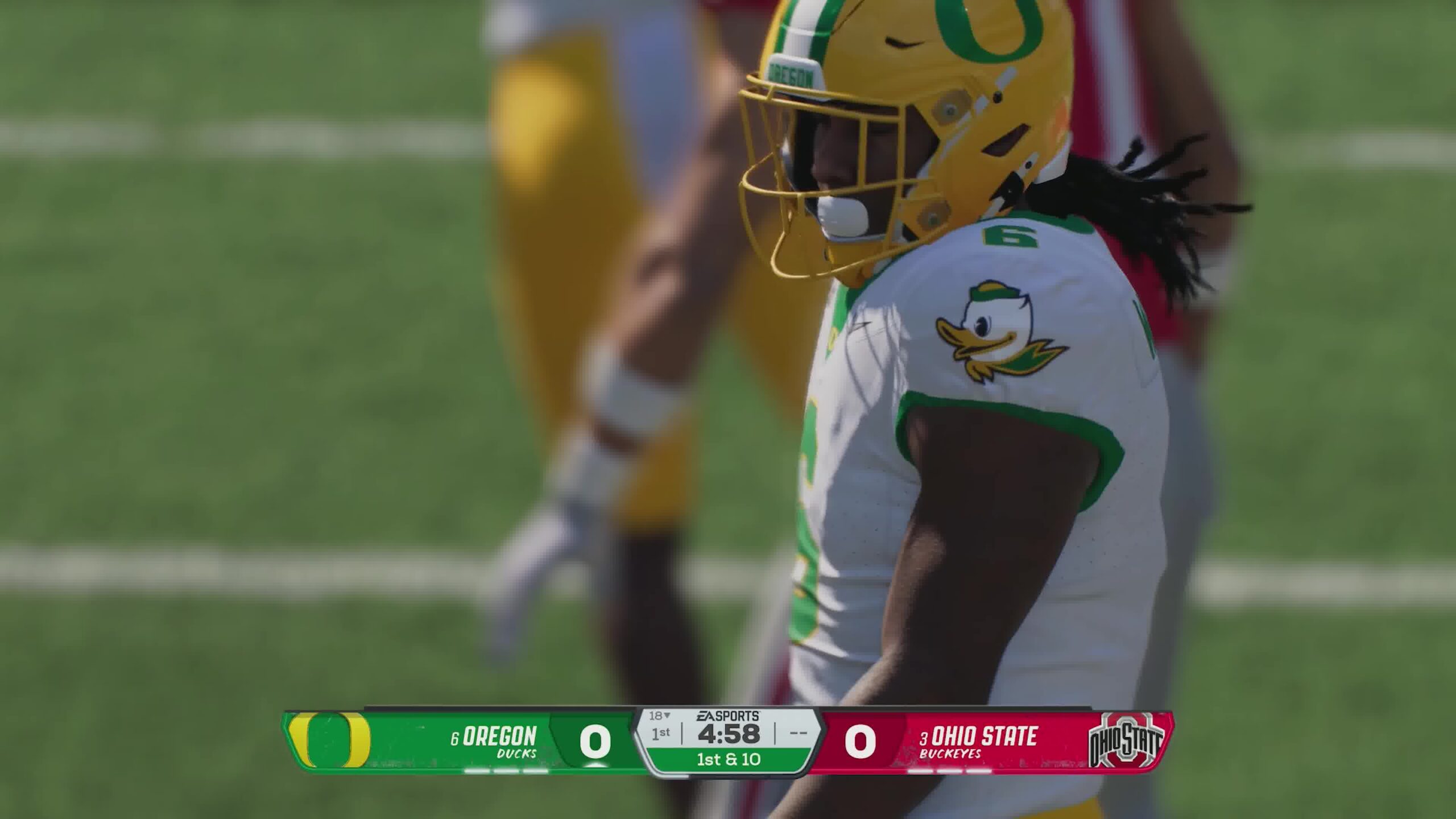
College Football 27 introduces one of the most transformative dynasty mode systems the series has ever seen: a fully simulated Name, Image, and Likeness (NIL) economy. This system fundamentally changes recruiting, roster retention, and transfer portal dynamics by tying every player’s value to evolving financial expectations rather than static ratings or simple scholarship offers.

For players who also engage with the in-game economy, resources like College Football 27 Coins will naturally become part of broader roster-building strategies, especially when managing long-term dynasty commitments and competitive online leagues.

NIL Expectations Are Now the Core of Recruiting

At the heart of College Football 27’s dynasty overhaul is a simple but powerful idea: every player now has an “expected NIL value.”

This value is not universal. It fluctuates based on:

  • School prestige
  • Player star rating
  • Position value (QB and premium positions demand more)
  • Dealbreakers and motivations
  • Brand exposure preferences
  • Coaching and program perks

A 5-star quarterback recruiting battle between a powerhouse program and a smaller school is no longer just about ratings or depth charts. The smaller program may need to offer significantly higher NIL compensation just to stay competitive, reflecting real-world recruiting economics.

Dynamic Expectations That Grow Over Time

One of the most important changes is that NIL expectations are no longer fixed.

A player can:

  • Increase their NIL demand after a breakout season
  • Request more money after awards or improved overall rating
  • Adjust expectations based on team success or role
  • Threaten transfer portal entry if underpaid

This creates a living contract system. A freshman might accept a modest deal, but by junior year, a star performer could demand exponentially more.

This is where dynasty budgeting becomes a long-term strategy rather than a one-time recruiting decision.

The Risk-Reward System of Overpaying Early

College Football 27 introduces a strategic dilemma: overpaying early can secure elite recruits—but it can also destabilize your entire roster budget later.

For example:

  • Offering 200% of a recruit’s baseline NIL may instantly win recruiting battles
  • But that same player’s future expectations will scale from that inflated starting point
  • By the time they become a star, they may demand unsustainable compensation

This creates a “compound contract effect” where early decisions directly shape future salary pressure across your roster.

Transfer Portal Becomes a Financial Battlefield

The transfer portal is now heavily NIL-driven. Unlike high school recruiting, where relationships and scouting still matter, transfers are much more transactional:

  • Players already know their value
  • Playing time and money dominate decisions
  • Negotiation windows are shorter and more aggressive

If your program cannot match evolving expectations, even elite starters can leave mid-dynasty.

Roster Management and Budget Compression

Another major system change is roster-wide NIL management. Every player now has:

  • Expected NIL value
  • Current NIL compensation
  • Satisfaction and retention risk

This forces constant roster optimization. Coaches must decide:

  • Who is worth extending financially
  • Who should be replaced by younger, cheaper talent
  • Where to allocate limited NIL resources (QB vs OL vs depth)

A single superstar quarterback can now consume a disproportionate share of your NIL budget, forcing sacrifices elsewhere.

Recruiting Strategy Shift: Scouting First, Spending Second

Unlike previous entries, College Football 27 separates scouting from recruitment more strictly:

  • Preseason is dedicated entirely to scouting
  • Scholarships now include NIL considerations immediately
  • Blind mass-offering is no longer viable

This makes early-season evaluation more important than ever. Misreading a recruit’s value can result in long-term budget inefficiency that takes multiple seasons to correct.

Weekly NIL Adjustments and Influence System

Recruiting battles now evolve week-to-week based on NIL adjustments:

  • Meeting expected NIL boosts interest gain
  • Underpaying reduces weekly influence
  • Overpaying increases interest—but raises long-term cost floor

There is even a cap on weekly influence bonuses for aggressive bidding, creating diminishing returns on excessive spending.

This ensures NIL strategy is not just about winning recruits—but winning them efficiently.

Long-Term Dynasty Implications

The NIL system effectively turns dynasty mode into a financial simulation layered over traditional football management. Success now depends on:

  • Budget forecasting across multiple seasons
  • Strategic overpayment only when necessary
  • Retention planning for rising stars
  • Balanced roster investment instead of superstar stacking

For players who also track in-game progression and resource optimization, even external systems like Buy CFB 27 Coins often get discussed in the context of accelerating roster experimentation and dynasty rebuilding strategies.

Conclusion

College Football 27’s NIL system is not just a feature—it is a structural redesign of dynasty mode itself. Recruiting is no longer about simply identifying talent, but about predicting financial trajectories and managing long-term roster economics.

Programs that adapt early will gain a massive advantage. Those that treat NIL like a traditional scholarship system will quickly find themselves outpaced, outbid, and out-recruited in an increasingly complex collegiate football ecosystem.
Game Changing Black Tech Grow a Garden 2 Secrets Tips Infinite Sheckles

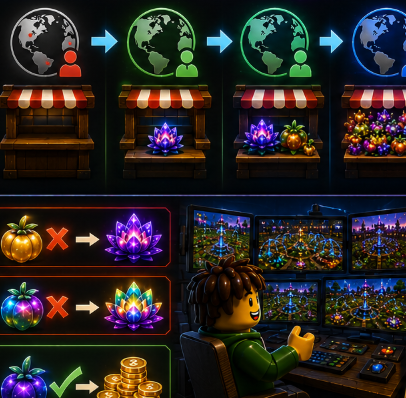
In the competitive economy of Grow a Garden 2, standard farming methods are no longer enough to keep up with top-tier players. To truly dominate servers and scale toward infinite Sheckles, players rely on advanced mechanics, timing strategies, and high-efficiency resource optimization.

High Efficiency Growth Timing Strategy

One of the most important advanced concepts is growth timing control. Instead of harvesting crops immediately at maturity, experienced players focus on optimizing environmental cycles such as day and night transitions.

By aligning harvest timing with in-game multipliers and server state changes, players can maximize mutation chances and overall yield value. Crops like Moon Bloom and Dragon’s Breath benefit heavily from precise timing, especially when managed in fully optimized sprinkler layouts.

Market Rotation and Server Optimization

Another core strategy involves smart server rotation and shop timing efficiency. High-level players avoid crowded servers and instead target fresh or low-competition instances to gain faster access to limited stock items.

This is where trading intelligence becomes critical. Many players actively monitor Grow a Garden 2 Items availability and reposition themselves to secure high-demand seeds before the market becomes saturated. Others engage in trading ecosystems where Grow a Garden 2 Items for sale listings are used to quickly scale inventory and unlock premium progression paths.

Automated Farming and Layout Efficiency

Passive income scaling depends heavily on layout design. The most effective farms use compact, fully optimized sprinkler coverage systems that ensure every crop remains at maximum growth efficiency.

Master Sprinklers and stacked irrigation zones allow players to maintain constant hydration without manual intervention. This reduces downtime and increases total mutation roll frequency, which is essential for long-term wealth generation.

When combined with high-value crops, this system turns a simple garden into a continuous production engine.

Mutation Scaling and Value Multipliers

The real financial breakthrough comes from mutation stacking. By combining environmental timing, optimized layouts, and high-tier boosts, players can significantly increase the probability of rare Gold and Rainbow variants.

These high-value outputs are the backbone of endgame progression. Once stabilized, mutation cycles create exponential income growth that quickly outpaces traditional farming methods.

To reach true infinite Sheckles potential, players must combine three systems: timing optimization, automated production, and market efficiency. High-tier Grow a Garden 2 Items accelerate progression speed, while active trading using Grow a Garden 2 Items for sale listings provides rapid access to rare upgrades.

Frequently asked questions about Escape from Tarkov

What will be discussed in Escape from Tarkov :

  • How to split ammo in Escape from Tarkov?
  • How do I split ammunition in Escape from Tarkov?
  • Which is better BEAR or USEC?
  • What is the difference between BEAR and USEC?
  • Where can I get cards in the game Escape from Tarkov?
  • Where can you get cards in Tarkov?
  • Adding friends and creating a team in Escape from Tarkov?
  • How to add friends?
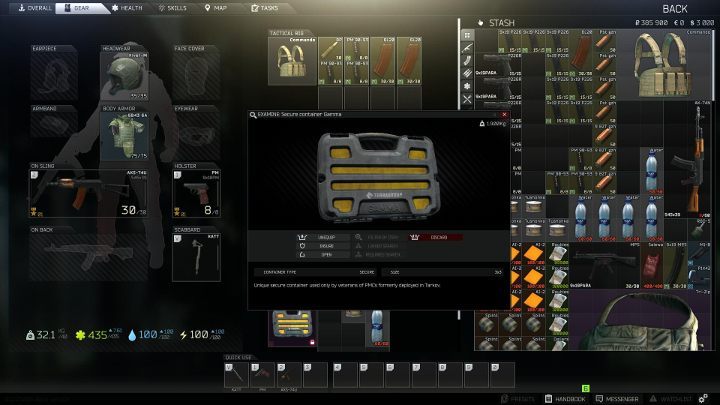
  • What is Gamma Container and where can I get it in Escape from Tarkov?
  • Where can I get containers?
  • How to play Escape from Tarkov offline?
  • How to play offline with bots?

How to split ammo in Escape from Tarkov?

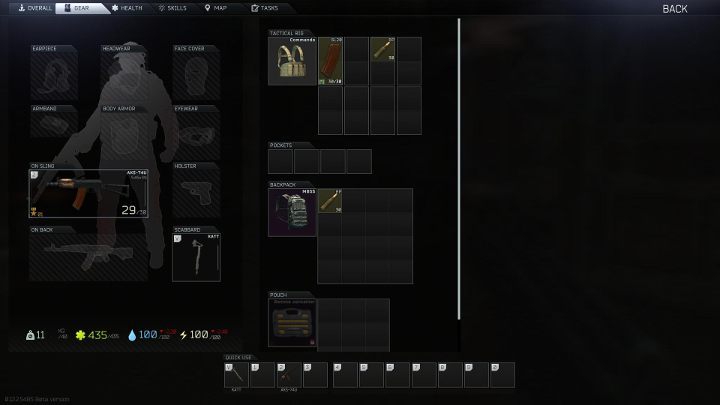
Separating ammo in Escape from Tarkov is useful when organizing your inventory before a raid. Remember that after death you will lose all your gear – don’t take all your ammo with you, just use the option to split it. That way, if you die, you won’t lose all your supplies – learn how to do it.

How do I split ammunition in Escape from Tarkov?

There is no dedicated button in the game for separating ammunition. You have to hold the left CTRL key on the ammo icon and then move it to an empty slot in your inventory. The selected ammo type will be split.

Which is better BEAR or USEC?

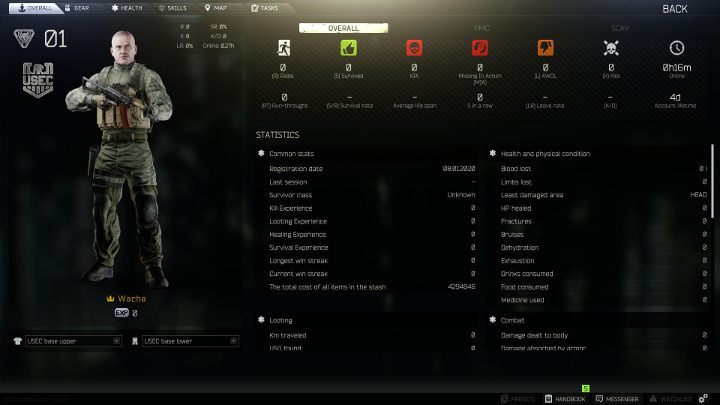
When you first start Escape from Tarkov, you have to make a decision – choose BEAR or USEC? The developers did not include information about the differences between these characters. Because of this, many players make this decision by accident. Here you will find out which faction is better – BEAR or USEC?

What is the difference between BEAR and USEC?

Currently, the differences between BEAR and USEC are small – they differ only in the language used. BEAR speak Russian and USEC speak English. You can hear these voices if you (or other players) press the Mumble key (Y is the default key). However, it should be added that the developers have mentioned unique features for both types of characters – we will be able to see them in future updates.

Buy Cheap Escape from Tarkov Roubles

Where can I get cards in the game Escape from Tarkov?

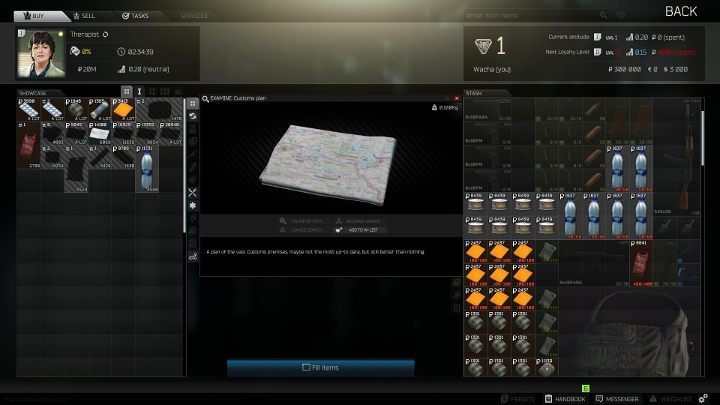
The area map is a very useful item in the world of Escape from Tarkov. After examining the map, you can mark the exit points before the start of the raid, as well as mark the most promising and interesting places for yourself. Knowing the location of buildings and the terrain, you can plan your movements and mark for yourself the places in which you are more likely to have useful equipment and opponents.

Where can you get cards in Tarkov?

Therapist is the name of a merchant who can sell you cards. At first, you will not have access to all cards, they will be blocked. The “Inspect” button will help you unlock and purchase them. There are quite a few different locations in the game and exploring them is part of the gameplay. We advise you to keep cards in special containers that allow you not to lose them after death in the raid.

How to add friends and creating a team in Escape from Tarkov?

In Escape from Tarkov you can play with your friends. Thus, you can create a coherent battle group in which each will have a role to play. This will give you a better chance of winning the raid.

How do I add friends?

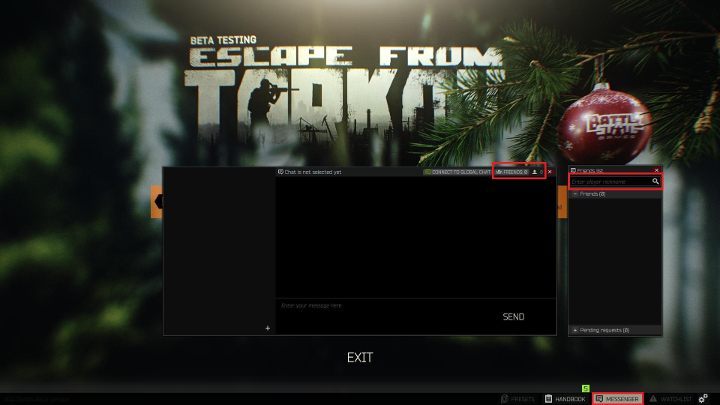
Adding a friend to your friend list is easy. The Messages button is visible in the lower right corner of the screen – click it. A new window will open – here you need to click the “Friends” button. Now you just need to enter your friend’s nickname – if they accept the invitation, they will appear in your friends list.

It’s just as easy to invite a friend to play together. First you need to join the raid. Select a map and go to the lobby window (list of players). Now press the Messages button again and then right-click on the alias of the friend you want to invite to the game – you will send the invitation.

What is Gamma Container and where can I get it in Escape from Tarkov?

The game Escape from Tarkov has one important feature after you die in a raid, you lose your equipment. In order to prevent the loss of important equipment, there are special containers in the game. The items you store in them will not disappear. There are three types of containers in total. Alpha, Beta, and Gamma. These containers differ in their size. Usually, these containers should be used to store the most important equipment – maps, ammunition, keys, and so on.

Where can I get containers?

There are several ways to obtain containers for storing equipment items. The first one is buying an extended version of the game. The largest Gamma container is provided to players when purchasing the most advanced version of the game. You can also purchase them from other players using the in-game market for this. The Gamma container has nine storage compartments.

How to play Escape from Tarkov offline?

The offline mode in Escape from Tarkov is very useful for novice players. Offline, you don’t need to worry about your inventory – your items remain intact even after you die or log out. However, this mode does not provide additional character experience or loot, but it is a great way to practice.

How to play offline with bots?

To start offline mode, you must follow the same steps as when playing with other players, with the only difference that you need to check a different option. Follow these steps:

  • Select “Escape from Tarkov” from the main menu.
  • Then select the PMC symbol.
  • You will see the main map – click on one of the locations and click “Next”.
  • This will lead you to the most important window – “Prepare to Run”. Select Enable Offline Mode For This Raid and then Enable PvE.
  • That’s all. You will start offline where your opponents will be bots.

Escape from tarkov customs the spawn points summary guide

Escape from tarkov customs the spawn points summary guide

Escape from Tarkov What are the spawn points of customs? After the players understand the spawn point in the game, they can help the player to master their surroundings and the route of the opponents they may encounter. Today I will share with you the Escape from Tarkov summary of the birth point of the customs. Interested friends will follow the small Let’s take a look together.

Escape from Tarkov Customs Spawn Points Summary
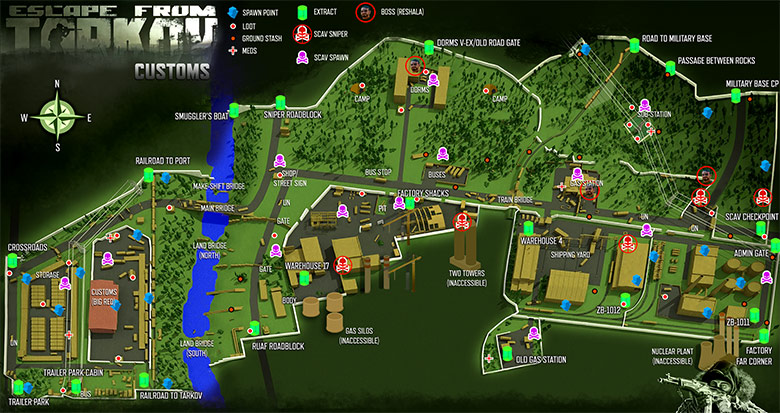
There are 18 PMC spawn points in the whole map of the customs map, including 9 on the left (west) and 9 on the right (east).

EFT Customs Map

The spawn points on the left (west) are:

  • 1. Northwest of the warehouse (near the armored vehicles at the evacuation point of the crossroads).
  • 2. The middle of the warehouse is east (you have a one-way ramp near the warehouse).
  • 3. Trailer park (near the evacuation point of the trailer park, you have 3 cars and a small wood near the warehouse wall).
  • 4. Outside the east wall of the warehouse (your north side is the high-voltage wire tower, the west side is the east wall of the warehouse, and the right side is the west wall of the red factory building).
  • 5. East Gate of Red Factory Building (you see the color of the factory building is red when you go out of the Red Factory Building, the left side is north and the right side is south).
  • 6. The northeast corner of the red factory building (you see the red factory building opposite to the wall, the northeast is behind, and the direction of the red factory is southwest).
  • 7. Outside the east wall of the red factory building (you back against the east wall, in front of a river, the direction of the river is east).
  • 8. The railway to the port (the wire tower on the right against the wall, the road in front, the bridgehead of some vehicles in front of the left, the river on the left, and the direction of the river to the east).
  • 9. The railway to Tarkov (back to the wall, the trailer park on the left, the river on the right, the forest in the front, the red factory building in the front on the left, and the east of the river).

The spawn points on the right (east) are:

  • 1. The northern part of the SC checkpoint (back to the wall, there is a high-voltage line in front of the left and the fence of the outpost, the road is in front, and the woods in other directions)
  • 2. Factory oil pipeline room (you are in a small room with doors on both sides, an oil pipeline in the middle, and north with oil storage tank when going out).
  • 3. Weapon factory (you are just in front of a door, you do n’t have to go in, you will see a sofa and an SC body at the door).
  • 4. Garage (there is a car in the garage. After coming out, the white workshop side is west and the oil storage tank side is east).
  • 5. Outside the east wall of the White workshop (born near the railroad tracks and the tank train, the side backing to the White workshop is west, and there is a van in the parking lot to the southeast).
  • 6. White workshop (the side where there is a large square and a crane is west).
  • 7. The south side of the warehouse (backed by the railway and the surrounding wall, the front is the warehouse, and the white factory building on the right front is the east).
  • 8. The west side of the evacuation point of the military base (backed against the wall, on the right side are the high-voltage line and power tower, and on the left side is the highway).
  • 9. The west side of the railway leading to the military base (near a high-voltage line tower, with a high-voltage line above, a train in front, and an east side on the train ride).

The above is the entire content of the Escape from Tarkov Customs Spawn points Summary Daquan I brought to you. Do you all know the relevant information? At last, If you need to buy escape from tarkov roubles, you can visit: eznpc.com.